










Kronos Workforce Central is being phased out. If your team is still running it, you’re working against a deadline UKG set for you. Workforce Central deployments hosted on Kronos Private Cloud lost engineering and cloud support at the end of 2025, and on-premises deployments have until March 2027 according to RSM, a UKG migration partner.
For a union manufacturing plant, energy site, or 24/7 government operation running shift rules that took years to configure, that timeline forces a real decision—and UKG’s own cloud products aren’t the only options. This post breaks down five Kronos alternatives built for complex, unionized, 24/7 operations.
How the 5 Kronos Alternatives Compare
| Platform | Best For | Key Features |
|---|---|---|
| Indeavor | Complex union scheduling | AI-driven pre-shift optimization, purpose-built for CBAs and quals |
| ADP WorkForce Suite | Deskless industrial compliance | Fatigue management + configurable pay/work rules for 24/7 ops |
| Oracle Cloud HCM | Oracle-ecosystem compliance | Labor-law/union-rule adherence built into cross-system scheduling |
| Infor WFM | Infor ERP manufacturing | Pay-rule automation inside an existing Infor manufacturing stack |
| TCP Software | Enterprise time & attendance compliance | Configurable CBA, fatigue, and certification rules built into shift assignment and time tracking |
A few familiar names are missing here on purpose. Deputy, Rippling, Paycom, and BambooHR show up in almost every generic “Kronos alternatives” list, but they’re built for SMB payroll and general HR administration — not the shift complexity this list focuses on.
Similarly, Teambridge and Netchex are solid options for retail and hospitality scheduling, but are unable to handle nuances like union rules, fatigue limits, and 24/7 industrial lines.
1. Indeavor

Best for: Complex, unionized 24/7 operations
Indeavor workforce scheduling software is built specifically for industrial enterprises running complex, round-the-clock operations. Key customers include manufacturing plants, energy facilities, food and beverage facilities, and government agencies with union contracts, multi-skill qualifications, and fatigue rules that must be enforced on every shift.
Where legacy Kronos Workforce Central handled basic timekeeping and static schedules, Indeavor builds schedules automatically around whatever rules you define. By incorporating seniority order, certification requirements, mandatory rest periods, and CBA-specific overtime rules in its pre-shift optimization approach, Indeavor keeps every shift staffed with a qualified worker before it starts, not after a supervisor notices a gap.
Indeavor’s supervisor workforce agent can handle the scheduling questions, backfill, approvals, and timesheet management that would otherwise fall entirely on frontline supervisors. Indeavor customers report:
- 47% reduction in frontline attrition
- 6% decrease in variable labor spend
- 90% automated frontline workforce scheduling
- 10–15 hour weekly reduction in supervisor administrative time
G2 reviews of Indeavor praise its intuitive navigation and mobile access, while report generation and holiday/exception scheduling are flagged as potential areas of improvement.
Key Features:
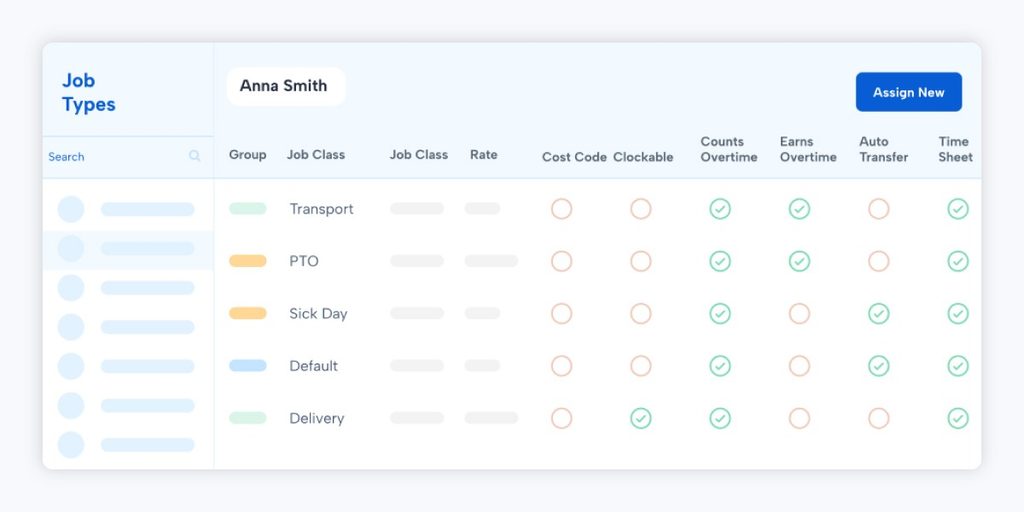
- Scheduling automation with a configurable rules engine for union contracts, seniority, and 24/7 rotations
- Automatically fill open shifts through Call Out Pro, which tracks, traces, and audits the overtime call-out process to cut grievances
- Skills and certification tracking with minimum-qualification thresholds, so no shift gets an unqualified assignment
- Mobile shift management for schedule visibility, shift swaps, and job bidding from the frontline
- Compliance management built around a configurable union and labor-law rules engine that applies automatically across every published schedule
| G2 Rating | 4.2/5 |
| Pricing | Custom enterprise quote — contact sales for details |
| Pros | Cons |
| Intuitive, easy-to-navigate interface | Advanced reporting has a bit of a learning curve at first |
| Strong mobile accessibility | Holiday and exception scheduling can require manual workarounds |
2. WorkForce Software (ADP WorkForce Suite)

Best for: Deskless, union-heavy 24/7 industrial compliance
WorkForce Software built its reputation as an independent enterprise workforce management vendor before it was acquired by ADP. The product is now sold as ADP WorkForce Suite, distinct from ADP Workforce Now, ADP’s separate mid-market payroll and HR platform.
Workforce Now handles basic time and attendance as one HR module among many, while WorkForce Suite was purpose-built for the scheduling complexity of deskless, hourly, and unionized workforces.
The platform names manufacturing, natural resources and utilities, and public sector operations directly as target industries, with a specific “fatigue management” calculation for shift-based roles and dedicated resources on navigating collective bargaining agreements.
G2 reviewers consistently praise the accurate time and attendance tracking and configurability for complex labor regulations. However, they describe the interface as dated and difficult to learn, on both desktop and mobile.
Key Features:
- Native ADP payroll integration
- Configurable pay and work rules
- Multi-jurisdiction compliance monitoring for organizations operating across state or country lines
- Fatigue management calculations built specifically for natural resources and utilities operations
- Job-based, cross-functional, and split-assignment scheduling for workers who move between roles or locations within a shift
| G2 Rating | 4.1/5 |
| Pricing | Custom enterprise quote — contact sales for details |
| Pros | Cons |
| Accurate time and attendance tracking | Interface described as dated on both desktop and mobile |
| Strong configurability for complex labor regulations | Steep learning curve |
3. Oracle Cloud HCM (Workforce Scheduling)

Best for: Enterprises standardized on Oracle ERP/HCM
Oracle’s workforce scheduling tools sit inside its broader Fusion Cloud HCM suite. It is built for organizations that want scheduling, time tracking, and payroll pulling from the same data model as their ERP and supply chain systems.
Oracle generates schedules in 15-minute increments while adhering to labor law and union regulations, and its Deskless Workforce module names Industrial Manufacturing directly as a supported sector, alongside skills- and certification-based worker-task matching.
That ERP-level integration is the draw for companies already running Oracle elsewhere in the business, but it comes with tradeoffs. According to the G2 review summary for Oracle Workforce Management, reviewers highlight the platform’s intuitive screens and real-time ERP integration, but consistently describe performance as slow. It also has a steeper implementation curve than smaller, purpose-built tools.
Key Features:
- Skills- and certification-based worker-task matching
- Employee self-service shift preference management
- Deskless Workforce mobile support for frontline, non-desk employees
- Scheduling in 15-minute increments that adheres to labor law and union rules
- Cross-system data integration across HCM, ERP, and supply chain planning for scheduling decisions
| G2 Rating | 3.7/5 |
| Pricing | Custom enterprise quote — contact sales for details |
| Pros | Cons |
| Intuitive user screens | Performance can slow down given system size and complexity |
| Strong integration with the broader Oracle ERP/HCM ecosystem | Less user-friendly, with a longer implementation timeline |
4. Infor WFM

Best for: Manufacturers already standardized on an Infor ERP
Infor Workforce Management lives inside Infor’s manufacturing- and distribution-focused ERP ecosystem. That’s a real advantage for an organization already running an Infor ERP elsewhere in the business. Scheduling, time and attendance, and labor forecasting can pull from existing data rather than setting up a separate system.
The tradeoff, based on G2’s review summary, is implementation time. Reviewers praise the platform’s simple, intuitive scheduling interface and its integration with other enterprise systems for compliance and attendance tracking, but they repeatedly flag high implementation costs and deployment timelines that often exceed a year.
Key Features:
- Built-in time and attendance module
- AI-powered labor forecasting tuned to specific industries
- Pay-rule automation engine for wage and overtime calculations
- Scheduling based on demand, skills, availability, and worker preferences
| G2 Rating | 3.7/5 |
| Pricing | Custom enterprise quote — contact sales for details |
| Pros | Cons |
| Simple, intuitive scheduling interface | High implementation costs |
| Strong integration with other enterprise systems | Deployment timelines that often exceed one year |
5. TCP Software
Best for: Enterprise time & attendance with built-in CBA and fatigue compliance
TCP Software, the company behind TimeClock Plus and Humanity Schedule, markets its manufacturing solution around a specific, direct claim: Configurable rules for overtime and break policies, fatigue limits, and collective bargaining agreements, plus shift assignment that auto-matches workers by skills, certifications, and availability. The enterprise tier is built for organizations of 2,500+ employees.
TCP’s flagship time and attendance product, TimeClock Plus, holds the strongest review volume of any platform on this list. G2 reviewers consistently point to ease of use and responsive customer support as top strengths, while noting some feature gaps relative to what’s promised and a higher price point than competitors.
TCP’s separate Humanity Schedule product, which handles the scheduling side specifically, carries the same 4.3/5 rating.
Key Features:
- Configurable compliance rules covering overtime, break policies, fatigue limits, and collective bargaining agreements
- Auto-assigned shifts matched to worker skills, certifications, availability, and labor law
- Durable, biometric time clocks built for harsh manufacturing environments
| G2 Rating | 4.3/5 |
| Pricing | Custom enterprise quote — contact sales for details |
| Pros | Cons |
| Ease of use and intuitive navigation | Some feature gaps relative to what’s promised |
| Responsive customer support | Higher price point than competitors |
How to Choose the Best Kronos Alternative
Before comparing feature lists, run every Kronos alternative on your shortlist through a few questions:
- Does it handle your union rules natively, or will you configure them yourself? Some platforms above ship with named CBA and fatigue-rule support out of the box; others require your team, or a costly implementation partner, to build that logic from scratch.
- Does it support certification- and qualification-based scheduling? If a shift requires a specific license, training, or skill level, the system should refuse to assign an unqualified worker automatically, not rely on a supervisor to catch the mistake.
- What does it cost to implement, not just to license? Several platforms on this list carry real implementation-time tradeoffs — Infor and Oracle reviewers, in particular, flag longer deployment timelines as a genuine cost, not a footnote.
- Does it already fit your tech stack? If you’re running Oracle or Infor ERP elsewhere in the business, that integration can outweigh a platform’s raw scheduling depth. If scheduling complexity is the actual problem you’re solving, a purpose-built tool will usually get there faster.
Explore Indeavor as an Alternative to Kronos
Most Kronos alternatives that turn up in a general search are built for retail and hospitality scheduling, not the union rules, fatigue limits, and 24/7 shift lines that define industrial and government operations.
The five platforms above were chosen because they handle that complexity, and Indeavor was purpose-built specifically for it, aimed at the operations where a scheduling error can mean a grievance, a compliance violation, or an unsafe shift.
If you’re ready to see what a forced Kronos migration could actually look like on your own schedule data, book a demo and bring your toughest shift pattern with you.
Kronos Alternatives FAQ
What is replacing Kronos?
For most current customers, UKG is migrating legacy Kronos Workforce Central users to UKG Pro Workforce Management (formerly branded UKG Dimensions), its newer cloud platform. It’s a decent option if your workforce management needs are straightforward, but it’s still a general UKG product.
Many organizations that have industrial operations with union rules, certifications, and 24/7 complexity are using this migration deadline as a reason to evaluate a purpose-built Kronos alternative instead of simply moving to another UKG product.
Who is UKG’s biggest competitor?
There’s no single, universally agreed-upon answer, as it depends on the market segment, but ADP is most often cited as UKG’s biggest competitor at the large-enterprise end of the broader HCM suite market.
Kronos vs. UKG: what’s the difference?
Kronos Incorporated and Ultimate Software signed a merger agreement on February 20, 2020, and unveiled the combined company’s new name, UKG (Ultimate Kronos Group), on August 28, 2020. The changes went into effect that October.
Kronos Workforce Central is the legacy, primarily on-premises timekeeping and scheduling product from before the merger. UKG is both the parent company and the umbrella brand for its newer cloud platforms, including UKG Pro Workforce Management and UKG Ready.
When does Kronos Workforce Central end?
According to RSM, a UKG migration partner, UKG set December 31, 2025, as the end of engineering and support for Workforce Central deployments hosted on Kronos Private Cloud, with on-premises deployments supported through March 31, 2027.
Share this post


